

A UV DTF printer gives print shops a flexible way to create full-color transfers for glass, metal, acrylic, plastic, coated wood, packaging, drinkware, phone cases, cosmetic containers, promotional products, and many other hard surfaces. It is popular because the workflow can produce premium crystal labels without printing directly on the object. For buyers, that opens a useful business model: print transfers in batches, store them carefully, and apply them to products when orders arrive.
This guide explains how UV DTF printing works, where it fits, how to plan costs, which products are best, and how MTuTech can use this topic to strengthen product-page authority for the UV DTF Printer page. It is written for small print shops, gift-product businesses, e-commerce sellers, promotional suppliers, and product decorators who want a practical buying framework rather than a simple feature list.


What Is a UV DTF Printer?
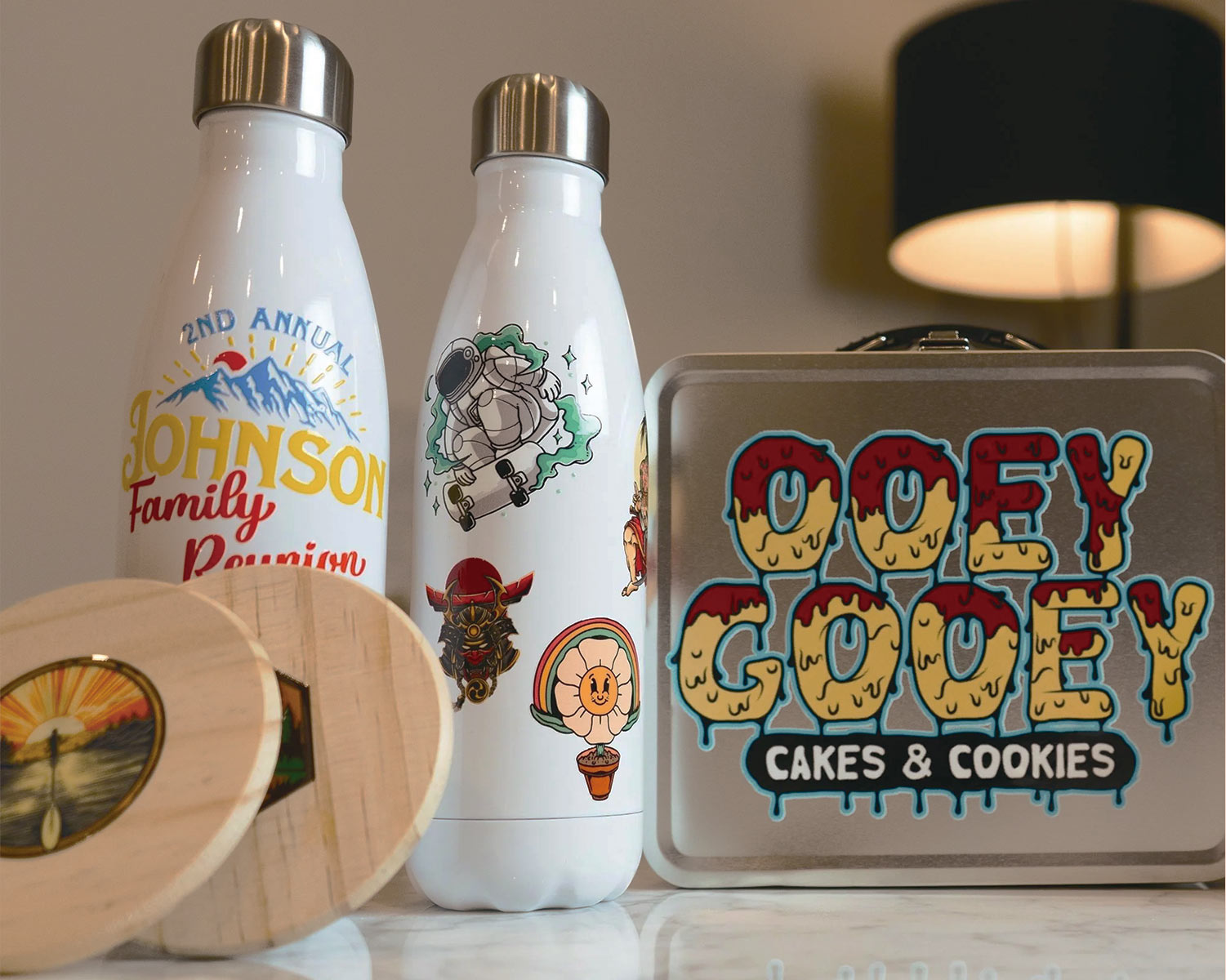
A UV DTF printer prints artwork onto a film system, commonly described as UV DTF film or AB film. The printed design is cured with UV light, laminated or transferred through the film workflow, and then applied to the final product surface. The result is often called a crystal label because it can look glossy, raised, durable, and premium when used on the right surface.
The biggest difference from a standard UV printer is that UV DTF does not require the product to be placed inside the printer. This can make it useful for irregular products, finished goods, curved items, packaging, and objects that are awkward to load on a flatbed. It can also help businesses sell pre-printed transfer sheets for later application.
Best Products for UV DTF Transfers
UV DTF printing works best when the customer wants sharp branding, full-color decoration, and a premium label feel on a hard product. The business opportunity is strong because many products need customization but are not convenient for direct printing. A print shop can create labels and apply them to finished goods, or supply transfer sheets to customers who apply them later.
- Drinkware and bottles: glass bottles, cups, mugs, tumblers, and promotional drink containers.
- Cosmetic packaging: jars, tubes, bottles, boxes, and luxury sample packaging.
- Phone and electronics accessories: phone cases, chargers, gadget shells, and branded accessories.
- Retail and promotional products: keychains, acrylic pieces, gift boxes, candles, and custom merchandise.
- Business labels: logo labels, QR labels, batch labels, seasonal labels, and limited-edition branding.
UV DTF is not a replacement for every printing method. It is strongest when flexibility, detail, small-batch customization, and easy application matter. For apparel fabric decoration, a buyer should compare DTF Printer options. For direct rigid printing, compare standard UV or flatbed UV systems. For hard-product labels and premium transfer decoration, UV DTF deserves attention.
UV DTF Printer vs UV Printer vs DTF Printer
Many buyers confuse UV DTF, UV printing, and DTF printing because the names overlap. The difference is the surface and workflow. UV DTF is mainly for hard-product transfer labels. UV printing is direct printing on suitable rigid or flexible surfaces. DTF printing is mostly associated with garment transfers. Choosing the wrong workflow can create poor product fit and weak ROI.
| Printer type | Best use | Common products | Main buying risk |
|---|---|---|---|
| UV DTF printer | Transfers for hard products | Glass, metal, acrylic, packaging, bottles | Using it on unsuitable surfaces or poor film storage |
| UV printer | Direct printing on products | Acrylic, wood, metal, signage, phone cases | Trying to load irregular items without the right setup |
| DTF printer | Garment transfer printing | T-shirts, hoodies, fabric items | Choosing apparel DTF for hard-product labels |
For internal linking, this article should mainly support the UV DTF Printer page. It also naturally links to UV Printer and DTF Printer because buyers often compare those categories before deciding.
How the UV DTF Workflow Works
The workflow can vary by machine and film system, but the core process is usually simple to understand. Artwork is prepared, printed onto film, cured, laminated or paired with transfer film, cut or separated, and applied to the product. A professional shop should control each step instead of treating the transfer like a basic sticker.
Artwork Preparation
Good UV DTF output begins with clean artwork. Logos should be high resolution. Small text should be checked before production. White ink layers, varnish effects, cut lines, and transparent areas should be prepared correctly. If the file is weak, the finished label will look weak even if the printer is strong.
Film and Ink Handling
Film quality affects transfer strength, gloss, release, and final appearance. Ink behavior affects color, opacity, adhesion, and durability. Shops should keep film sealed, clean, dry, and away from dust. Poor film storage can create bubbles, weak transfer, or inconsistent release. This is one reason a UV DTF printer should be managed like a production system, not only a desktop gadget.
Application to the Product
Application looks simple, but it still needs consistency. The surface should be clean. The transfer should be aligned carefully. Pressure should be even. The film should be removed at the right angle and speed. A premium transfer can look poor if the final application is rushed.

Cost and Pricing Model for UV DTF Labels
UV DTF pricing should include more than film and ink. A good quote should account for artwork setup, test prints, film usage, ink, white ink, varnish if used, lamination or transfer film, cutting, rejected pieces, packing, labor, and profit. If the shop sells transfer sheets to another business, packaging and handling matter too.
The best way to protect margin is to price by sheet, label area, design complexity, and service level. A simple logo sheet should not be priced the same as a detailed variable-data sheet with many small labels. A customer who needs urgent turnaround should also be priced differently from a repeat customer with predictable files.
| Pricing factor | What to include | Why it matters |
|---|---|---|
| Film usage | A film, B film, test space, rejected sheets | Film waste affects real cost |
| Ink and effects | CMYK, white ink, varnish or gloss effects | Premium effects use more consumables |
| Artwork setup | File cleanup, layout, spacing, proofing | Small labels can take serious preparation time |
| Application labor | Cleaning, alignment, pressure, inspection | Applied transfers require human consistency |
| Packing and delivery | Protection for sheets or finished products | Damaged labels reduce customer trust |
Quality Checklist Before Selling UV DTF Products
Before launching a UV DTF service, test the products you plan to sell most often. Do not test only one perfect sample. Print a small batch, apply the labels to real products, and check them after handling. Customers will judge the final product, not the machine specification sheet.
- Check edge lifting after application.
- Test scratch resistance on the target surface.
- Check color accuracy under normal lighting.
- Review small text, QR codes, and fine lines.
- Test application on curved, glossy, matte, and textured surfaces.
- Store printed transfers and check performance after a few days.
- Document which surfaces work best and which should be avoided.
This testing process also gives the sales team stronger proof. Instead of saying the printer can print labels, the shop can show which products were tested, how the label looks, and what customers can expect.
Common UV DTF Mistakes
The first mistake is treating UV DTF labels like ordinary stickers. The value is in the premium finish, sharp detail, and compatibility with hard products. If the artwork is low quality or the application is rushed, the result will not feel premium.
The second mistake is storing film badly. Film should be protected from dust, humidity, pressure marks, and contamination. A shop that ignores film handling may blame the printer when the actual issue is storage or application.
The third mistake is trying to sell every surface without testing. UV DTF can work on many hard products, but surface energy, texture, coatings, curves, and product use all matter. Build a tested product list first, then expand carefully.

Business Ideas for UV DTF Printing
A UV DTF printer can support several business models. The most obvious model is selling finished customized products. Another model is selling transfer sheets to local makers, promotional suppliers, small brands, and e-commerce sellers. A third model is using UV DTF labels inside an existing packaging or product decoration business to offer low minimum order quantities.
Custom Product Shop
This model focuses on finished products such as bottles, jars, phone cases, candles, gift boxes, and promotional items. The shop controls both the transfer and the application, which helps quality control. It also allows higher selling prices because the customer receives a finished item.
Transfer Sheet Supplier
This model sells printed transfer sheets to customers who apply them independently. It can scale well if artwork intake, sheet layout, packing, and instruction sheets are organized. The shop should include clear application guidance to reduce customer mistakes.
Packaging and Brand Label Service
Small brands often need premium labels without huge minimum order quantities. UV DTF can support short-run cosmetic labels, seasonal packaging, sample packaging, QR labels, and limited-edition product branding. This can be a strong B2B offer when combined with fast turnaround.
Buying Checklist
- Confirm whether your target products are hard surfaces, apparel, or direct-print rigid media.
- Test real products before promising durability to customers.
- Ask about supported film workflow, ink configuration, white ink, varnish, and curing.
- Calculate pricing by sheet area, artwork time, consumables, waste, and labor.
- Plan film storage, packing, and customer application instructions.
- Build a tested product list before selling broadly.
- Review training, spare parts, maintenance, and after-sales support.
FAQ: UV DTF Printer
Is UV DTF the same as DTF printing?
No. DTF printing is mostly used for garment transfers, while UV DTF is mainly used for hard-product crystal labels and transfers. Buyers should choose based on the final product surface.
Can UV DTF labels be used on bottles?
Yes, bottles are a common application when the surface is suitable and the label is applied correctly. Glass, coated metal, plastic, and other surfaces should be tested before selling at scale.
Do UV DTF transfers replace a UV flatbed printer?
Not completely. UV DTF is excellent for transfers and hard-product labels. A UV flatbed printer is better for direct printing on many rigid items. Some businesses may use both workflows.
Which MTuTech page should I visit next?
Start with the UV DTF Printer page. If you also want direct-to-object printing, compare the UV Printer page. For garment transfers, review the DTF Printer page.
Final Takeaway
A UV DTF printer is a strong option for businesses that want flexible custom labels for hard products, short-run brand decoration, premium crystal labels, and product personalization without placing every object inside the printer. The winning workflow is not only printing the transfer. It is artwork preparation, film handling, application consistency, product testing, pricing discipline, and a clear service menu. When those pieces are in place, UV DTF printing can become a practical authority-building and revenue-building category for MTuTech customers.
How to Create a UV DTF Service Menu That Customers Understand
A UV DTF printer becomes much easier to monetize when the shop sells clear services instead of only saying, “we print UV DTF.” Customers may not understand the technology, but they understand custom labels, premium logo transfers, product branding, bottle decoration, small-batch packaging, and hard-surface stickers. The service menu should translate the machine capability into offers that customers already want.
A strong menu can include custom crystal logo labels, bottle and jar labels, product launch label sheets, QR code labels, branded packaging labels, promotional product transfers, and transfer sheets for makers. Each offer should explain suitable surfaces, minimum quantity, artwork requirements, expected finish, and turnaround time. This reduces confusion and makes the shop look more professional.
High-Intent UV DTF Offers
- Custom logo crystal labels: premium brand labels for packaging, gifts, and retail products.
- Bottle and jar transfers: decoration for glass, plastic, cosmetic packaging, candles, and drink containers.
- Small business label sheets: short-run labels for handmade sellers, boutiques, and product launches.
- QR code and variable-data labels: functional labels for batches, events, campaigns, and tracking.
- Promotional product transfers: logos and designs for hard goods used in corporate gifting.
Storage, Packing, and Customer Instructions
Many UV DTF problems happen after printing, not during printing. Transfer sheets can be damaged by dust, pressure, bending, heat, humidity, or careless packing. If a shop sells sheets to customers who apply them later, the customer experience depends on storage and instructions. A beautiful printed transfer can still fail if it is shipped badly or applied to a dirty surface.
Finished transfer sheets should be stored flat, protected from dust, and packed in a way that prevents scratching or pressure marks. Customer instructions should explain surface cleaning, alignment, pressure, film removal, and the surfaces that are not recommended. This is especially important for e-commerce sellers because customers may blame the print shop if they apply the transfer incorrectly.
Customer Instruction Checklist
- Clean the product surface before applying the UV DTF transfer.
- Do not touch the adhesive or printed area with oily fingers.
- Align the transfer carefully before pressing it down.
- Apply even pressure across the full label.
- Peel the film slowly at the recommended angle.
- Test one product before applying a large batch.
Adding these instructions makes the service feel more premium and reduces complaints. It also gives the business more content opportunities because application guides, storage guides, and troubleshooting guides can rank for long-tail searches.