
Printing on curved and tapered surfaces is one of the most rewarding yet technically demanding areas in modern product customization. From branded bottles and premium drinkware to industrial components and decorative home goods, non-flat printing opens the door to creativity and high-value applications. However, achieving precision on irregular shapes requires more than standard flatbed techniques.
In this comprehensive guide, you’ll learn how to print accurately on curved and tapered surfaces, what challenges to expect, which tools and materials to use, and how to optimize your workflow for consistent, professional results. Whether you’re running a print shop or scaling a manufacturing operation, this website-ready guide will help you master the process.
Why Printing on Curved and Tapered Surfaces Is Challenging
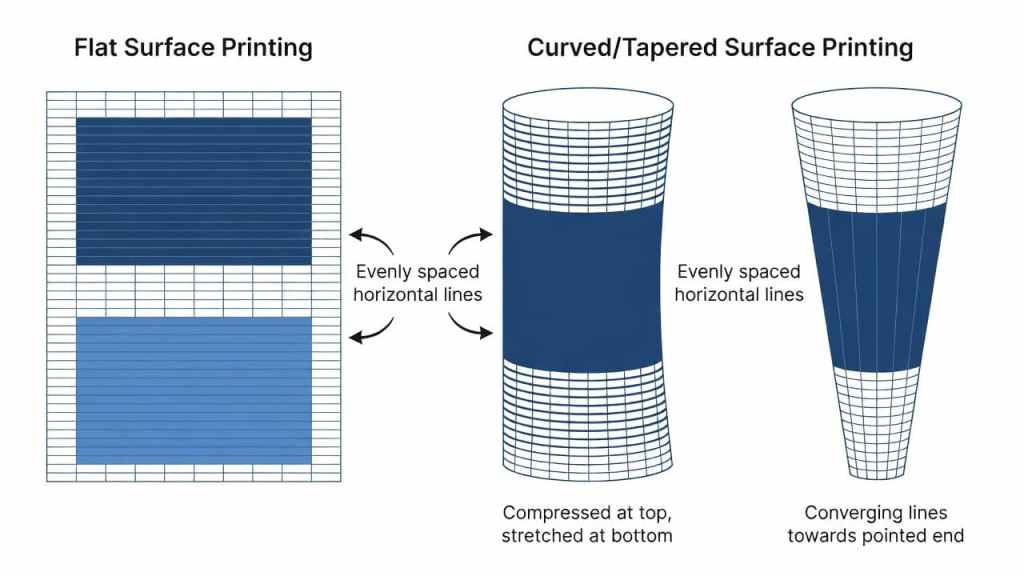
Unlike flat substrates, curved and tapered objects introduce variables that directly impact print quality. Understanding these challenges is the first step toward solving them.
1. Surface Geometry and Distortion
Curved and tapered surfaces cause designs to stretch or compress when applied. If artwork is not properly adjusted, logos may appear warped, text may look uneven, and proportions can be distorted.
For example:
- Cylindrical objects require horizontal wrapping alignment.
- Tapered items (wider at one end) require calculated scaling adjustments.
- Irregular shapes need customized mapping.
Without compensation, even high-resolution artwork can look flawed.
2. Ink Adhesion Issues
Ink adhesion becomes more complex on curved items due to:
- Variations in material composition
- Surface coatings
- Glossy or textured finishes
- Changes in pressure during printing
If ink does not bond properly, you may experience fading, cracking, or smudging.
3. Alignment and Registration Accuracy
On non-flat surfaces, precise placement is critical. Even a few millimeters of misalignment can ruin branding consistency. Maintaining consistent registration across multiple units can be especially difficult without the right equipment.
4. Pressure and Contact Control
Flat printing allows even pressure distribution. Curved surfaces, however, require controlled contact to prevent:
- Ink pooling
- Smearing
- Uneven curing
- Incomplete image transfer
Understanding these issues allows you to build a process that minimizes risk and maximizes accuracy.
Essential Equipment for Printing on Curved and Tapered Surfaces

The quality of your results largely depends on the equipment you use. Specialized machines dramatically improve precision and consistency.
Use a Dedicated Cylindrical Printer
A cylindrical printer is specifically engineered to handle round and tapered objects. These machines rotate the product during printing, ensuring even ink application around the surface.
When selecting a printer, look for:
- High-resolution print heads for detailed graphics
- Adjustable rotational mechanisms
- Compatibility with multiple diameters
- Automatic height adjustment
- UV curing integration for fast drying
High-end cylindrical printing systems also support tapered adjustments, allowing for more advanced surface compensation.
Adaptive Print Head Technology
Flexible or floating print heads maintain consistent distance from the surface. This reduces the risk of head strikes and uneven ink distribution.
Rotational Calibration Systems
Advanced systems include digital calibration features that measure object dimensions and adjust artwork positioning automatically.
Choosing the Right Materials for Reliable Results
Even the best printer cannot compensate for poor material choices. Selecting appropriate inks and substrates is critical.
Specialized Inks for Curved Surfaces
For durable and vibrant results, use inks designed for adhesion on non-flat materials:
- UV-curable inks for glass, metal, and plastic
- Solvent-based inks for industrial parts
- Flexible inks for items that experience handling or minor bending
UV inks are especially popular because they cure instantly and bond well to treated surfaces.
Surface Preparation Matters
Before printing:
- Clean the object thoroughly
- Remove dust, oil, and residue
- Apply primer if necessary
- Ensure surface coatings are compatible with your ink
Proper surface preparation dramatically improves adhesion and longevity.
Design Optimization for Curved and Tapered Printing
Artwork preparation is where accuracy truly begins. Even a perfect machine setup cannot fix poorly prepared design files.
Adjust for Surface Curvature
Use professional design software to compensate for distortion. Techniques include:
- Warping artwork to match curvature
- Scaling edges differently for tapered items
- Using vector graphics for sharper results
- Creating wrap templates
For tapered objects, you may need to create a trapezoidal layout instead of a rectangular one.
Create Accurate Mockups
Always preview designs using 3D mockups before printing. This helps visualize:
- Text placement
- Logo distortion
- Proportional balance
- Branding alignment
Mockups reduce costly mistakes.
Run Test Prints
Before full production:
- Print on sample materials
- Check alignment
- Test ink adhesion
- Verify curing quality
Testing ensures your final production run meets quality standards.
Calibration and Setup: The Key to Precision
Calibration separates professional operations from inconsistent ones.
Step 1: Measure Object Dimensions Precisely
Record:
- Diameter at top and bottom
- Height
- Taper ratio
- Printable area limits
Use digital calipers for accuracy.
Step 2: Align Artwork Placement
Position the design based on:
- Visual center
- Handle placement (for mugs)
- Seam locations
- Branding guidelines
Consistency across batches builds brand trust.
Step 3: Adjust Print Head Height
Maintain proper distance between the print head and surface. Too close causes smudging; too far reduces clarity.
Step 4: Control Rotational Speed
Synchronization between rotation and ink application is crucial. Uneven speed can stretch or compress the print.
Using Jigs and Fixtures for Consistency
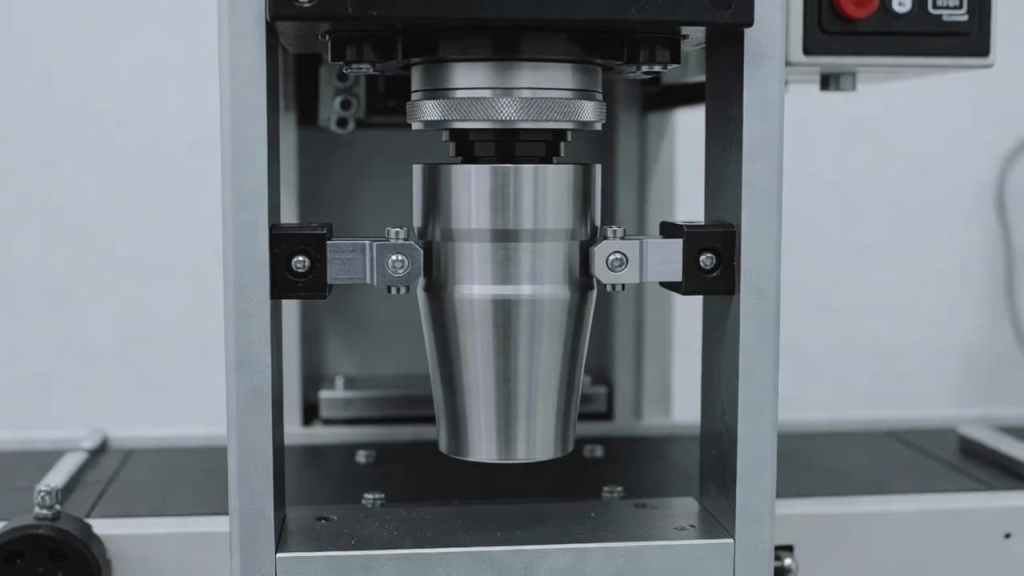
Jigs and fixtures improve repeatability and reduce human error.
Custom Molds
Custom molds hold products in fixed positions during printing. These are ideal for:
- Irregular shapes
- Premium glassware
- Industrial components
Adjustable Clamps
Clamps stabilize tapered objects and prevent shifting mid-print.
Rotational Fixtures
These ensure consistent axis alignment, which is essential for full-wrap printing.
Investing in reliable fixtures improves production efficiency and minimizes waste.
Best Practices for High-Quality Output
Follow these professional tips to elevate your print quality:
- Always clean substrates before printing.
- Use high-resolution artwork (300 DPI or vector format).
- Avoid overly small text on curved edges.
- Maintain consistent environmental conditions.
- Perform regular machine maintenance.
- Store inks properly to preserve viscosity.
Consistency in workflow leads to predictable, repeatable results.
Common Applications of Curved Surface Printing

Printing on curved and tapered surfaces unlocks multiple commercial opportunities.
Promotional Products
Customized drinkware, bottles, tumblers, and giveaways are high-demand branding tools. Accurate printing enhances brand perception.
Industrial Marking
Manufacturers print serial numbers, barcodes, and logos on pipes, machine components, and cylindrical parts.
Home and Decorative Goods
Printed ceramics, glassware, and decorative containers are popular in retail markets.
Cosmetic and Beverage Packaging
High-end packaging relies on flawless cylindrical printing for brand presentation.
Benefits of Mastering Curved Surface Printing
Accurate curved printing provides significant advantages:
Enhanced Product Appeal
Clean, distortion-free prints create a premium look.
Expanded Service Offering
You can accept more complex projects and increase revenue streams.
Stronger Competitive Position
Few businesses truly master tapered surface printing. Excellence in this area differentiates your brand.
Reduced Material Waste
Precise calibration minimizes rejected products.
Troubleshooting Common Issues
Even experienced operators face occasional challenges. Here’s how to solve them.
Problem: Design Appears Warped
Solution: Recalculate taper ratio and adjust artwork template.
Problem: Ink Smudging
Solution: Reduce print head pressure and verify curing intensity.
Problem: Poor Adhesion
Solution: Clean surface thoroughly and apply primer if required.
Problem: Inconsistent Alignment
Solution: Recalibrate rotational axis and use a fixture.
Problem: Color Variation
Solution: Check ink levels and maintain stable environmental conditions.
Systematic troubleshooting prevents repeated errors.
Workflow Optimization for Production Environments
If you operate at scale, consider implementing:
- Automated loading systems
- Barcode-based alignment tracking
- Digital file management
- Batch-based calibration settings
- Quality control checkpoints
Standardizing procedures improves output and reduces training time for new operators.
Maintenance Tips for Long-Term Performance
Maintaining your equipment ensures consistent quality.
- Clean print heads regularly.
- Perform scheduled calibration checks.
- Inspect rotational mechanisms.
- Replace worn fixtures.
- Store materials in climate-controlled areas.
Preventive maintenance reduces downtime and protects your investment.
Frequently Asked Questions
Can I use a standard flat printer for curved surfaces?
For small, low-volume projects, it may be possible with manual adjustments. However, specialized cylindrical printers deliver significantly better accuracy and consistency.
What type of ink is best?
UV-curable inks are widely preferred due to strong adhesion and quick curing. Solvent-based inks may be better for industrial applications.
How do I prevent design distortion?
Adjust your artwork using surface mapping techniques and test before full production.
Are jigs always necessary?
Not always, but they are highly recommended for complex or tapered shapes to improve consistency.
How do I clean my printer after use?
Follow manufacturer guidelines. Typically, this includes cleaning print heads, removing ink residue, and ensuring no debris remains on moving components.
Final Thoughts
Printing on curved and tapered surfaces may seem complex, but with the right strategy, tools, and preparation, it becomes a powerful capability that sets your business apart. The key lies in understanding surface geometry, optimizing your artwork, using specialized equipment, and maintaining precise calibration.
By mastering these techniques, you can confidently produce high-quality, distortion-free prints on bottles, mugs, industrial components, and beyond. As demand for customized products continues to grow, businesses that excel in accurate curved surface printing will enjoy greater flexibility, stronger branding opportunities, and long-term competitive advantages.Explore our high-quality cylindrical printers here
Invest in the right technology, refine your workflow, and commit to precision. The results will speak for themselves.
How This Printing Business and ROI Topic Helps Buyers Choose the Right Printer
This guide is most useful for buyers researching printing business and roi and comparing real production choices before speaking with a supplier. The practical decision is not only the machine name. Buyers also need to understand material compatibility, workflow, operator skill, ink behavior, finishing steps, maintenance, and the type of jobs the printer can produce profitably.
For MTuTech.store, this article supports the wider Printing Business and ROI topic cluster by answering a specific search question and then guiding readers toward the relevant product page. That structure helps users move from education to comparison without forcing them to search the site again.
What to Check Before Buying
- Confirm the target products, materials, and daily production volume.
- Ask for sample prints that match real customer work, not only perfect demo pieces.
- Compare ink, media, labor, maintenance, training, and waste before calculating ROI.
- Check service support, spare parts, installation training, and operator documentation.
- Review whether the printer fits your workspace, power, ventilation, and finishing workflow.
Best-Fit Applications
This topic is relevant for custom printing, short-run production, branded product decoration, and businesses that need repeatable output. The best-fit applications usually depend on substrate, artwork detail, color expectations, durability requirements, and order size. A buyer should list the top five products they want to sell, then test those products before scaling production.
| Decision area | Why it matters | What to verify |
|---|---|---|
| Application fit | Prevents buying a machine for the wrong product mix | Test real customer products and materials |
| Workflow | Controls speed, labor, and repeatability | Map artwork, printing, finishing, inspection, and packing |
| Running cost | Protects profit margin | Include ink, media, waste, labor, parts, and downtime |
| Support | Reduces risk after installation | Ask about training, parts, and troubleshooting response |
Buyer FAQ
What keyword should this article help rank for?
The primary keyword target is printing business and roi. Supporting terms should include application phrases, troubleshooting phrases, pricing phrases, and comparison phrases related to printing business and roi.
Which MTuTech product page should readers visit next?
The strongest next step is the UV printer page because it connects the educational topic to a commercial product category.
How can a print shop use this information?
A print shop can use this guide to build a shortlist of applications, estimate job pricing, prepare sample tests, and ask better questions before buying equipment. That makes the article useful for search visitors and for sales conversations.
Recommended MTuTech Resources
Use these related pages to compare equipment choices and continue researching the right production setup.
- UV printer – compare machine options, applications, and production fit.
- DTF Printer – compare machine options, applications, and production fit.
- Hybrid uv printer – compare machine options, applications, and production fit.
- Printing Business and ROI articles – read more guides in this topic cluster.
- MTuTech Blog – browse more UV, DTF, textile, and production workflow resources.